Blog
Empower your legal team with Google collaboration

Head of Customer Success, AODocs · Jun 7, 2023 · Updated Oct 6, 2026
Everyone can agree that collaboration is important for a business or project to succeed. However, nowadays, globalization is causing corporations to open offices in multiple countries, while remote work continues to increase following the Covid-19 pandemic. These shifts mean everyone is more likely to collaborate with people located in a different location. Thus, efficient remote collaboration is becoming essential to businesses of all sizes.
Efficient remote collaboration is a must-have for legal teams
In many industries, remote collaboration is not a new concept. Multinational developers teams are used to working remotely, yet collaboratively, to develop the best products. However, in the legal industry, remote collaboration can be a struggle as teams need to check how their tools handle shared editing, permissions and review.
Contract Lifecycle Management (CLM) solutions allow businesses to automate their contract processes at every key stage: creation/generation, negotiation, approval, execution, ongoing management as well as renewals. The collaboration features and supported document formats differ by product and configuration. Teams should test how real-time collaboration fits their review process.
Collaboration is hard but key to an efficient contract management process. When you are negotiating a contract, many different stakeholders are usually involved and, without the right collaboration tools, they work on their own separate copies of the contract, sending new revisions back and forth via email, wasting a lot of time and creating a proliferation of “almost final” copies of the document.
Any legal department looking for efficiency and quality must implement true collaboration between its legal team member, legal team and other business stakeholders. With efficient remote collaboration tools, lawyers will work more efficiently, gain time, and better share knowledge to avoid reinventing the wheel each and every time.
AODocs CLM: Contract Management Workflows Using Google Collaboration
AODocs CLM supports Google Workspace contract workflows with document controls. Thanks to this specificity, AODocs CLM allows legal teams to leverage Google’s collaboration tools while still bringing configured controls for contract access and review (corporate ownership, granular permission management, version control, audit log, etc.).
As an in-house legal counsel at AODocs, I believe all of Google’s collaboration tools are great (Google Chat, Google Meet, Google Sheet, Google Slides, etc.) but the AODocs’ legal team’s favorite is the Google Docs editor. Google Docs provides shared editing, comments and suggestions that legal teams can use in contract review.
We know lawyers sometimes struggle to move from Microsoft Word to Google Docs, so you might think “I want to keep using MS Word so this does not concern me”. Well, stay tuned, because it does concern you even if you want to stick with Microsoft Word!
- In the workflow described in this article, AODocs CLM managed both Google format documents and Microsoft format documents, building a bridge between Google Drive and Microsoft documents. Notably thanks to our Universal File Opener Chrome extension that allowed users to open non-Google files locally on their computer using the corresponding software. Check the supported desktop application, extension version, checkout behavior and save-back configuration before using this workflow for contract review.
- Second, since December 2020, Google Docs editor can natively support MS Word documents so you can collaborate in real-time on MS Word in your Google Docs editor (without needing to convert your MS Word to Google Docs like it was required in the past). Feature availability can differ by file format and account; test the required review functions on a representative Word file.
Let us highlight a few Google features that our legal team loves and uses to work more efficiently remotely:
Collaborate in real-time
Google Docs supports real-time collaboration. You can collaborate on Google Docs in real-time to write or redline a contract collaboratively with one (or more) coworker.
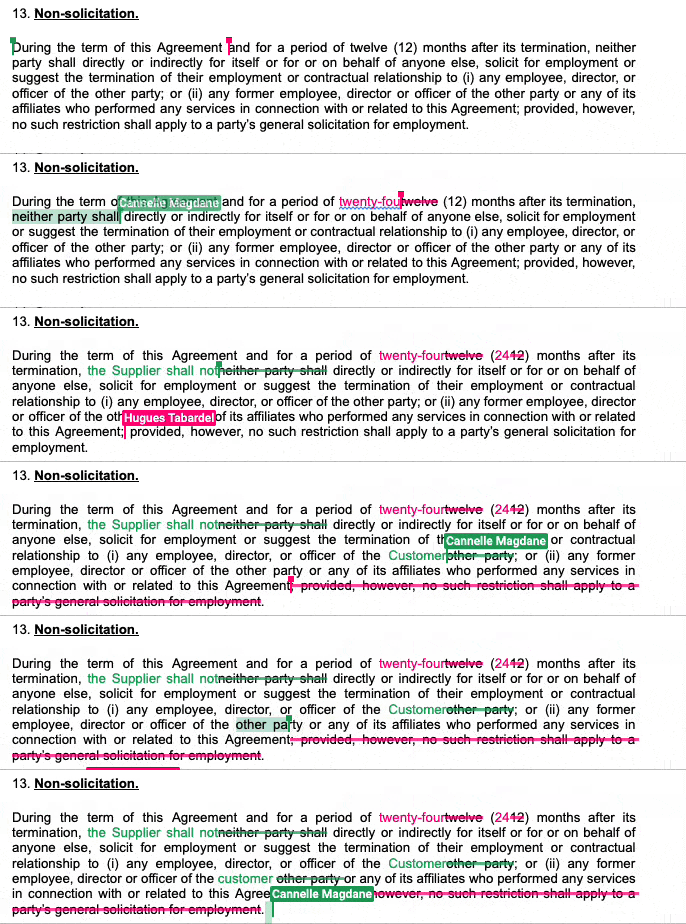
Google Docs editor : real-time collaboration in action (Verify required features on a representative Word file)
Moreover, if you want to collaborate while still keeping tight control over the changes made in a document you can grant only limited access (called “Commenter” access) to your coworker rather than full edit rights. Your coworker will only be able to make changes to the documents in track changes or suggesting mode (and such changes won’t change the original text until approved by someone with full edit rights). AODocs CLM allows you to easily manage permissions on all your contracts at a granular level and can help you leverage this “Commenter” access Google feature. It’s a great solution if some of your coworkers tend to forget to activate the track changes features before changing a sensitive contract!
See and hear team members while collaborating
One of the new features released by Google in May 2021 that our legal team particularly likes at AODocs is the possibility to take your Google Meet directly in your Google Docs, Sheets, or Slides (see animation below, © Google). This takes collaboration to another level as teams are now able to co-edit a contract in real-time while seeing and hearing each other.
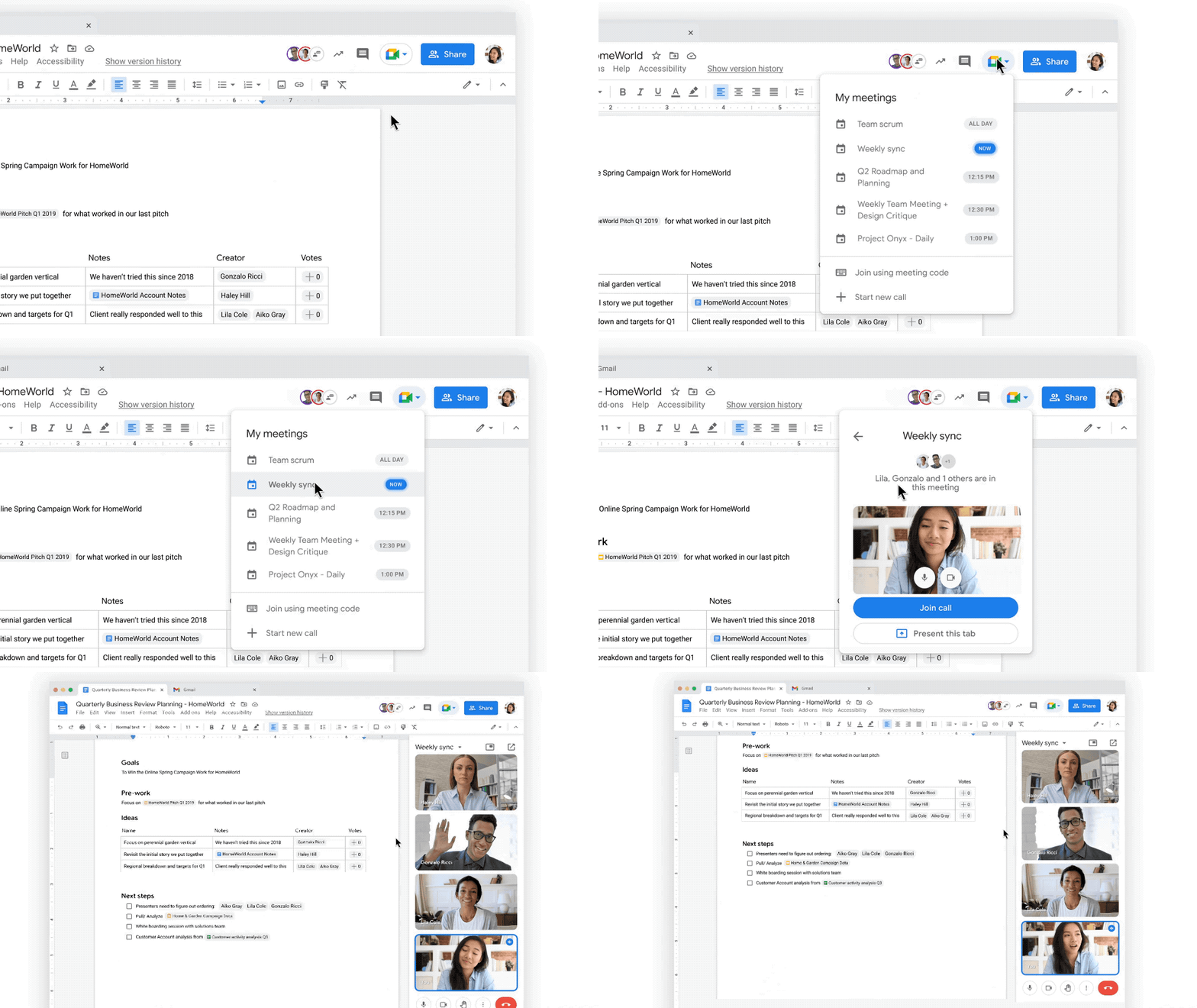
Google Docs editor : take your meetings directly from the document you are working on (Verify file-format and account support)
Work in One Shared Contract
Along with real-time collaboration, Google collaboration will bring another key advantage to your legal team: fewer separate copies to consolidate. This reduces the need to consolidate separate edits. Reviewers still need to identify and preserve the version approved for negotiation or signature.
With AODocs CLM, built on top of Google Drive, authorized collaborators can work on the same document, the single version of the truth of the contract, safely stored into your Google Drive and controlled by AODocs CLM contract repository. Preserve an approved version checkpoint before signature, even when collaborators edit one shared document.
Tag and assign tasks to people
Real-time collaboration is great, but efficient asynchronous collaboration is equally important! With Google Docs and AODocs CLM, you can tag and assign tasks to people directly in the contract you are working in, gaining time, reducing email overload, and avoiding having multiple copies of the contract in circulation.
In a hypothetical review, you see a data privacy clause. Rather than sending an email to Bob, your data privacy lawyer, just select the clause, leave a comment and assign it to Bob. Where task assignment is supported for the file format and account, and Bob has access, the configured notification can direct him to the clause that needs review in your contract (the single version of truth of this contract safely controlled by AODocs CLM).
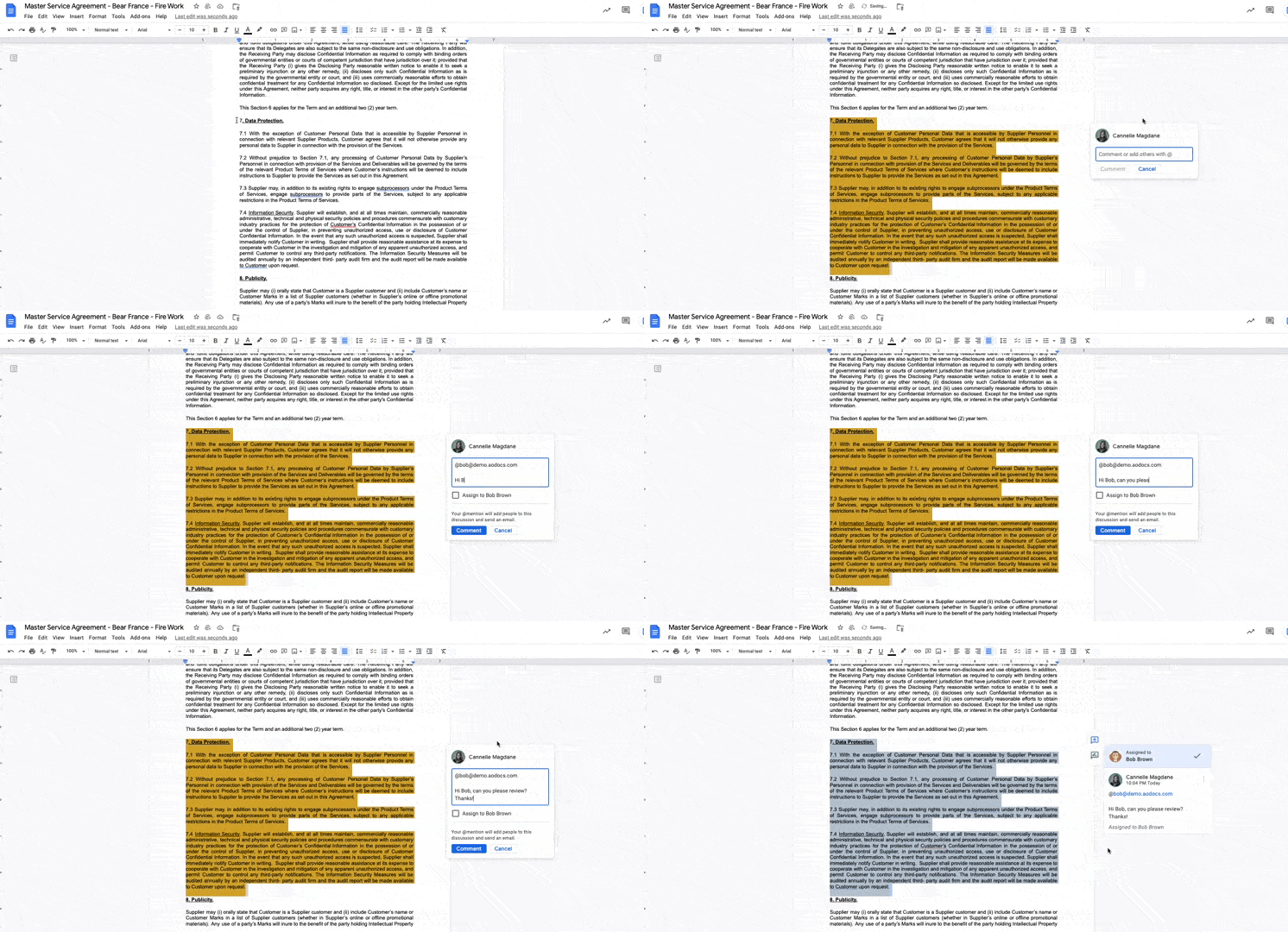
Google Docs editor - tag and assign tasks to coworkers (Verify task-assignment support for the file format)
Access your contract full edit history …
Google Docs editor offers version history allowing you to inspect available changes made to your contract or other legal documents, and easily restore a previous version.
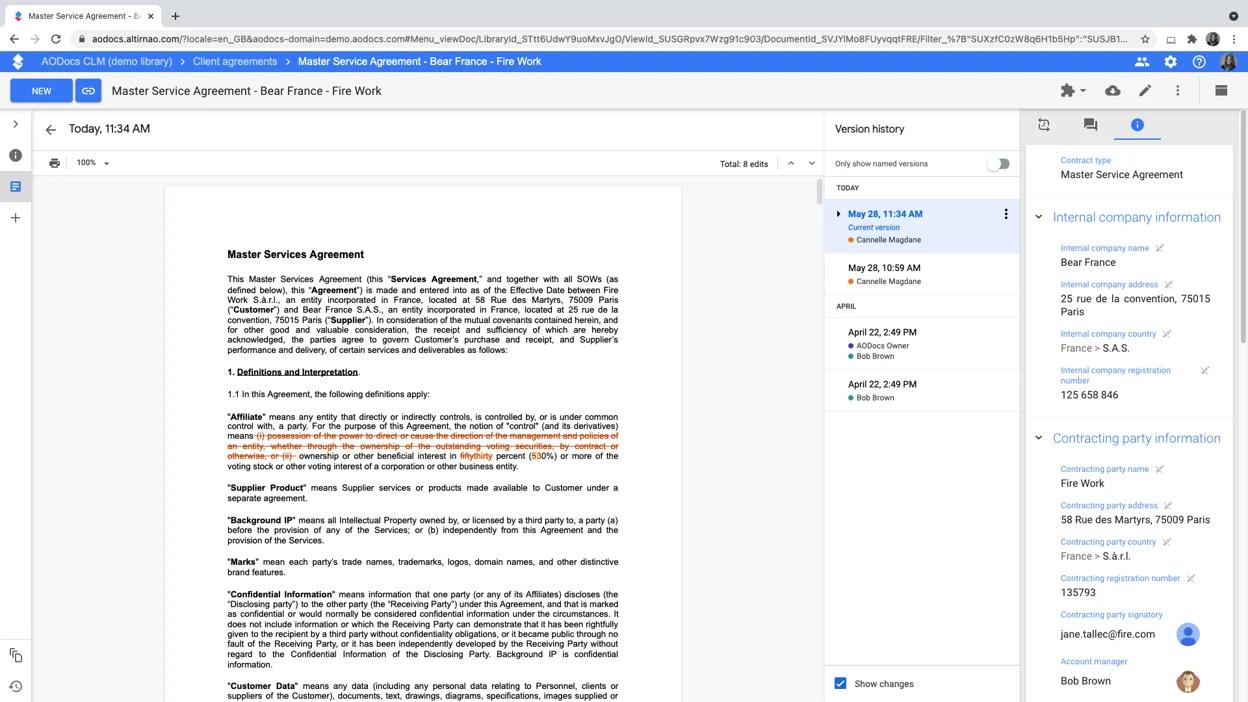
Google Docs editor (embedded into AODocs CLM) : access the version history of your contract (Verify available version history for the file format)
We know that Google edit history is often not sufficient for lawyers who need stronger version control. AODocs CLM offers a powerful version control feature so your team will be able to leverage both Google’s full edit history and more traditional version control.
… or just the edit history of a specific clause or sentence
The historical example below illustrates the ability to see the edit history of a specific paragraph or sentence. Check current account eligibility and supported file formats before relying on this feature:
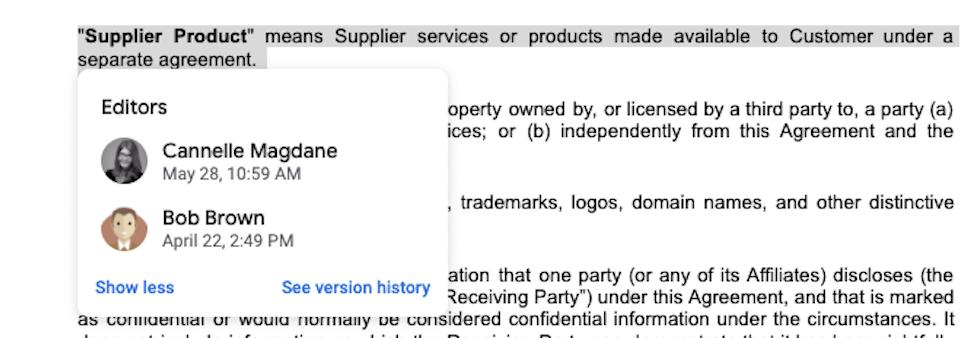
Google Docs editor : see the edit history of any selected text (verify availability for the file format and account used)
Easily review and redline contracts on the go
Another major benefit of Google is their “mobile-first” approach: Google provides mobile apps for Gmail, Google Drive and Google Docs; supported features can differ from desktop. Moreover, this article also illustrates an AODocs mobile application workflow. Confirm current mobile support and the required review features before deployment.
Mobile collaboration is key. If your employees cannot use the required review features on all devices, there is a high chance they will switch back to their old way by just sending documents as email attachments.
In the historical example below, the AODocs mobile app allowed you to locate and access your contract records and key information related to them. Confirm current document-opening behavior, supported file formats and available Google Docs mobile review functions for your deployment.
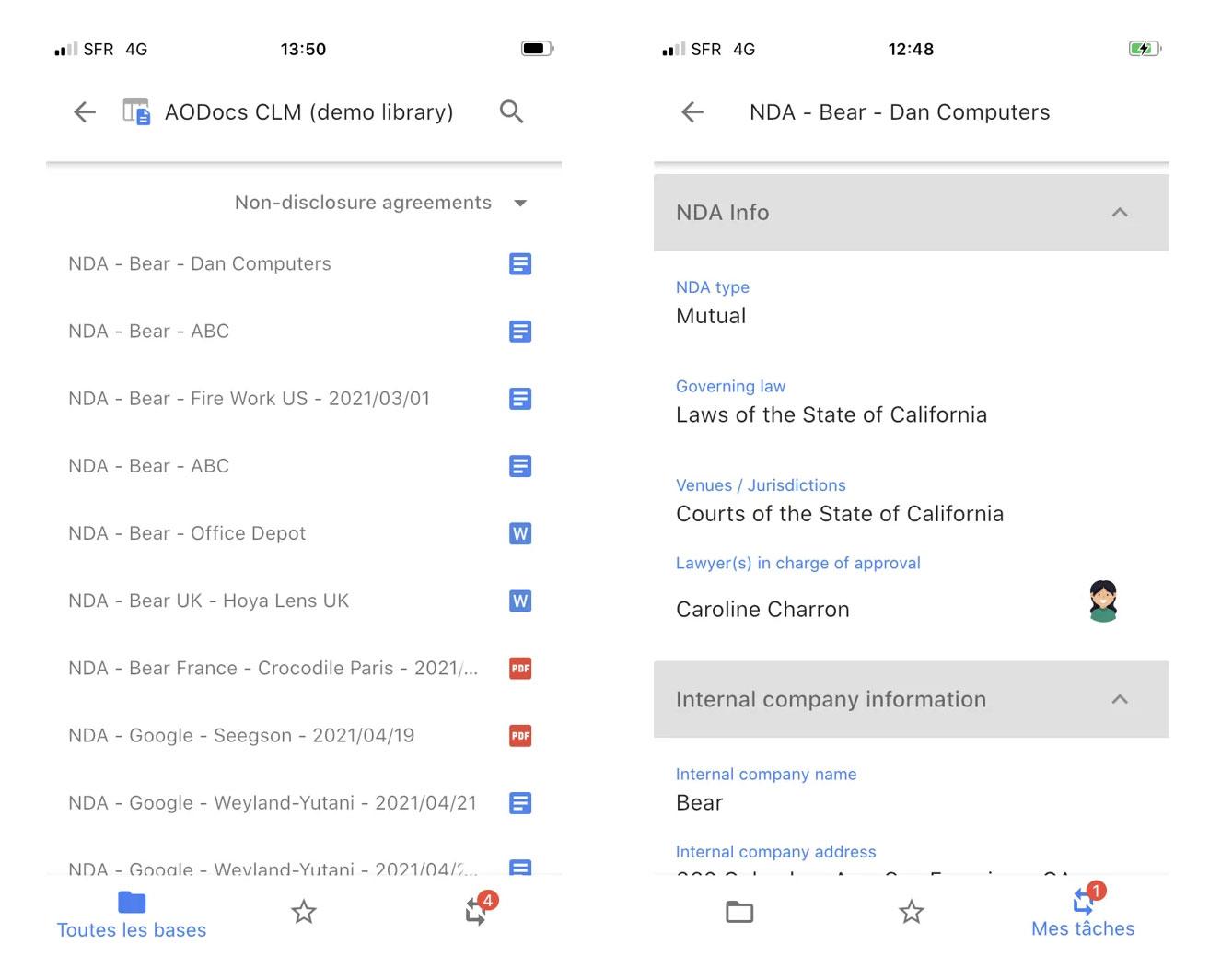
AODocs CLM mobile app – locate your contract, see all key information and open your contract for review and redline (through the Google Docs mobile app,
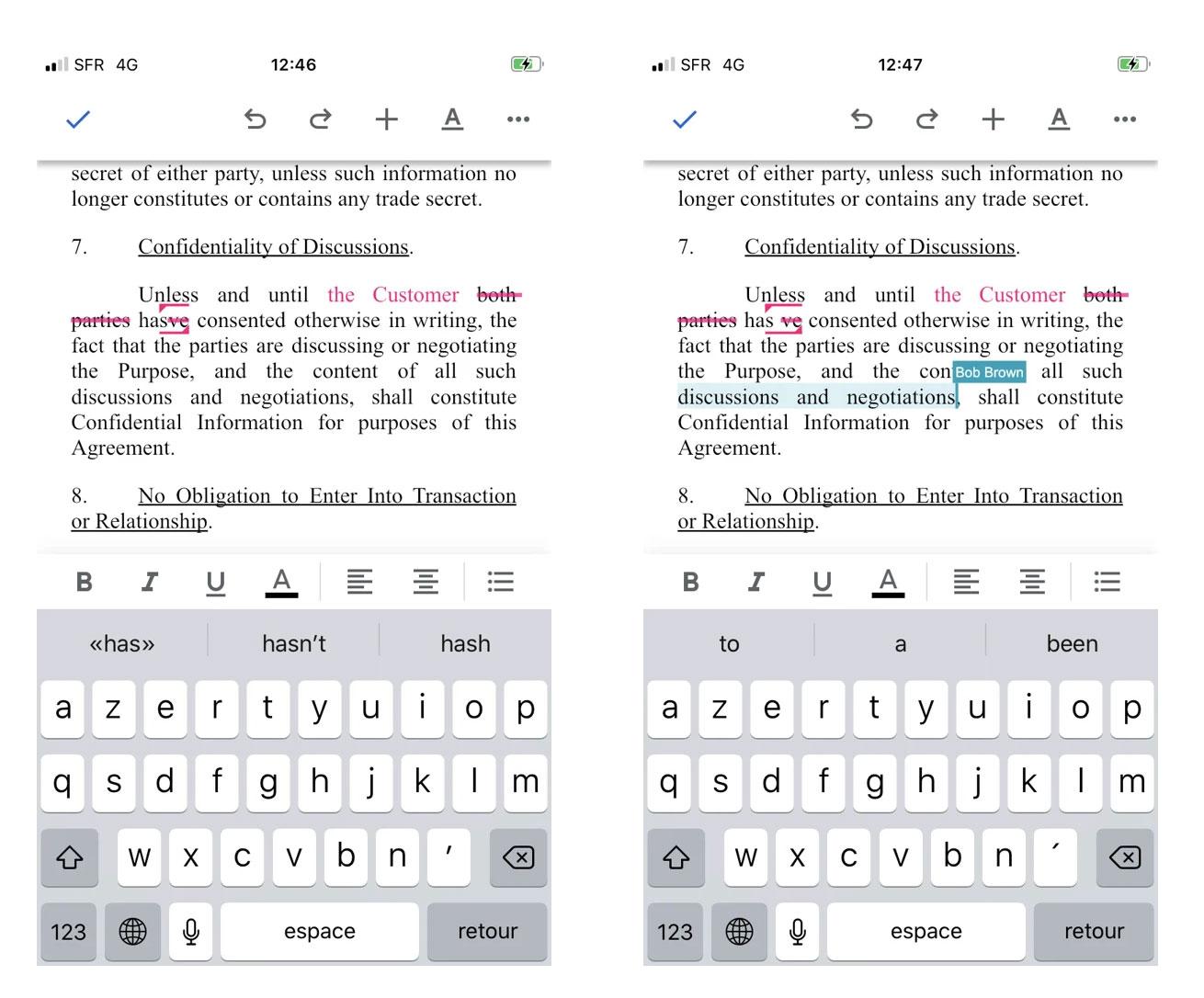
Google Docs mobile app : track changes and collaborate in real-time (Verify the required mobile review functions)
Are you wondering why you are not using Google collaboration capabilities yet? Maybe because collaboration is great but contracts and the data they contain are so sensitive that control is paramount? You are right, control is key when contracts are concerned. But control should not come at the expense of collaboration! And this is where AODocs CLM can change the way your legal team works, bringing the level of control required for contracts while still allowing your team to leverage Google’s collaboration features to work more efficiently.
Frequently asked questions
How can a legal reviewer suggest Google Docs edits without changing the contract text?
Give the reviewer permission to comment or edit and use Google Docs Suggesting mode. Suggested changes leave the original text in place until accepted. This separates proposed wording from accepted wording, but accepting a suggestion is not the same as completing the organization's formal contract approval process.
Can a legal team collaborate on a Word contract in Google Docs without converting it?
Google Docs supports editing, commenting and collaboration on Office files while saving changes in the original Office format. Confirm that the file and required features are supported for your workflow, and check the output before sharing it externally. Editing a Word file in Google Docs is distinct from converting it into Google Docs format.
Does a shared contract document remove the need for version checkpoints?
Keep formal checkpoints for reviewed, approved and signed contract versions even when the team collaborates in one document. Collaborative editing helps collect changes, while checkpoints identify the wording authorized for negotiation or signature. Define who can accept changes and how the approved version is preserved before moving to the next stage.