

Can we keep our existing bucket and container structure?
Yes. AODocs does not impose a storage hierarchy. Document sets, properties and permissions live in the platform layer, which means you can reorganize one without touching the other.
S3 and Azure Blob Storage keep your files durable, available and cheap, at any scale. But once your application needs to find a document, control who reads it, prove what happened to it or decide how long to keep it, you are building a document platform. AODocs is that platform, on the storage you already chose.
If your application only needs to upload, store and retrieve files, object storage such as Amazon S3 or Azure Blob Storage is an excellent choice: reliable, scalable, inexpensive and easy to integrate.
If it needs to understand, organize, control, search, process and retire documents, you will build a substantial amount of software around the storage. AODocs is that software, already built: a document management platform for your application to run on, not just a place to keep files.
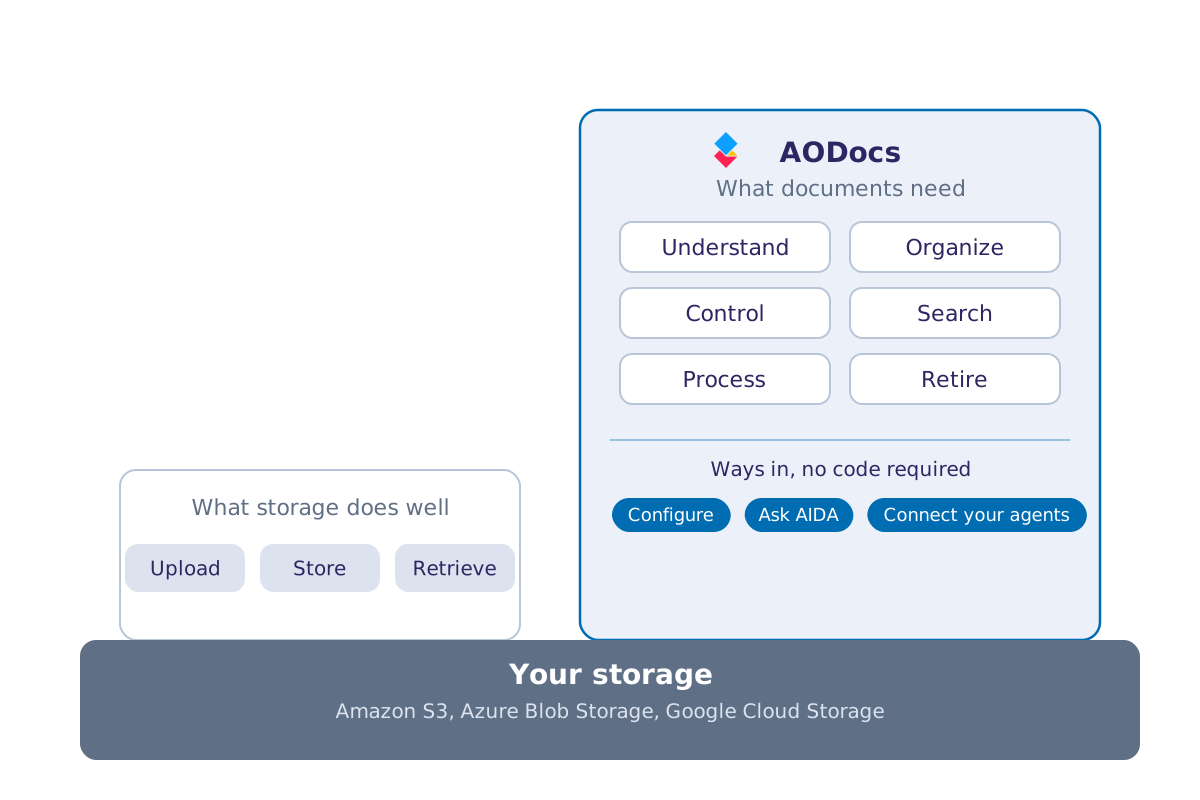
Object storage was never meant to know what a document means.
That is a design decision, not an omission.
| Capability | Amazon S3 | AODocs |
|---|---|---|
| Store and retrieve files | Native | Native, on the storage you choose |
| Document metadata | Object tags and metadata; business metadata to build | Structured, configurable business metadata by document type |
| Versions | Object versioning | Document versions, revisions and lifecycle control |
| Business status | To build separately, in custom code | Configurable statuses such as draft, in review, approved, obsolete |
| Access permissions | IAM and bucket policies | Permissions that follow the document and its workflow |
| Approval workflows | To build separately, in custom code | Configurable workflows |
| Search | Object listing and metadata queries; content search through other services | Integrated search across documents and metadata. Trusted AI features. |
| Audit trail | AWS logging services | Document activity and workflow history |
| AI | AWS AI services or custom models to integrate | Advanced AI-powered metadata extraction and document classification. Trusted answers, grounded in validated documents. |
| User interface | To build separately, in custom code | Ready-made interface, alongside your application |
| APIs for applications | Extensive storage APIs | Document-oriented APIs |
Store and retrieve files
Amazon S3
Native
AODocs
Native, on the storage you choose
Document metadata
Amazon S3
Object tags and metadata; business metadata to build
AODocs
Structured, configurable business metadata by document type
Versions
Amazon S3
Object versioning
AODocs
Document versions, revisions and lifecycle control
Business status
Amazon S3
To build separately, in custom code
AODocs
Configurable statuses such as draft, in review, approved, obsolete
Access permissions
Amazon S3
IAM and bucket policies
AODocs
Permissions that follow the document and its workflow
Approval workflows
Amazon S3
To build separately, in custom code
AODocs
Configurable workflows
Search
Amazon S3
Object listing and metadata queries; content search through other services
AODocs
Integrated search across documents and metadata. Trusted AI features.
Audit trail
Amazon S3
AWS logging services
AODocs
Document activity and workflow history
AI
Amazon S3
AWS AI services or custom models to integrate
AODocs
Advanced AI-powered metadata extraction and document classification. Trusted answers, grounded in validated documents.
User interface
Amazon S3
To build separately, in custom code
AODocs
Ready-made interface, alongside your application
APIs for applications
Amazon S3
Extensive storage APIs
AODocs
Document-oriented APIs
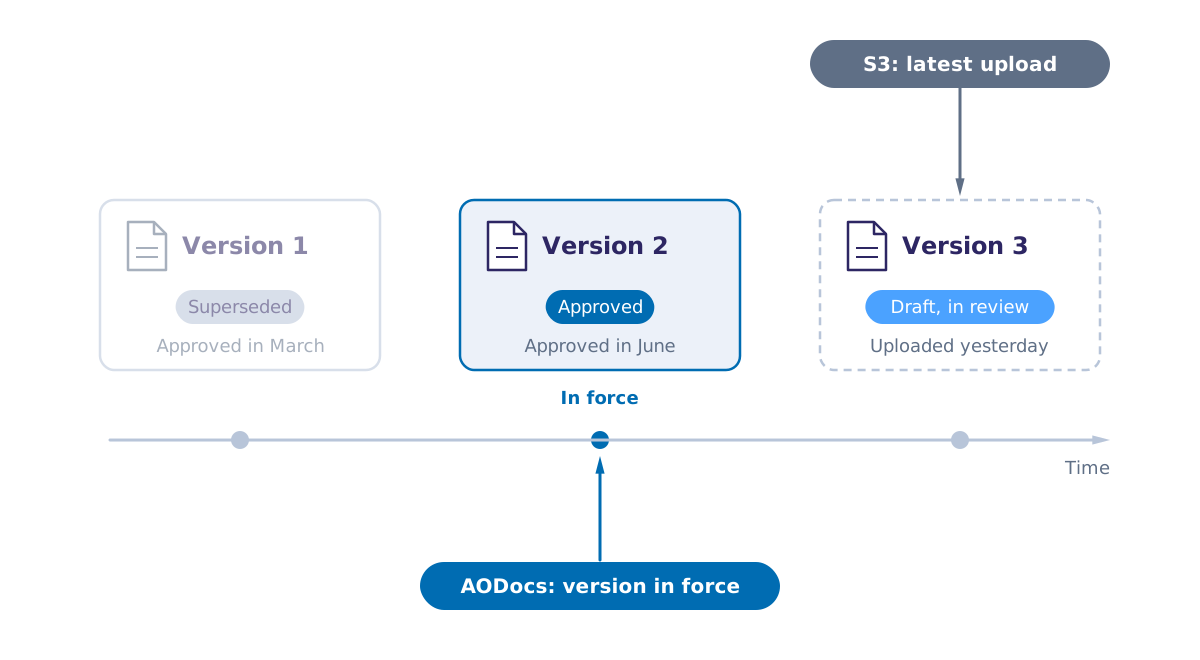
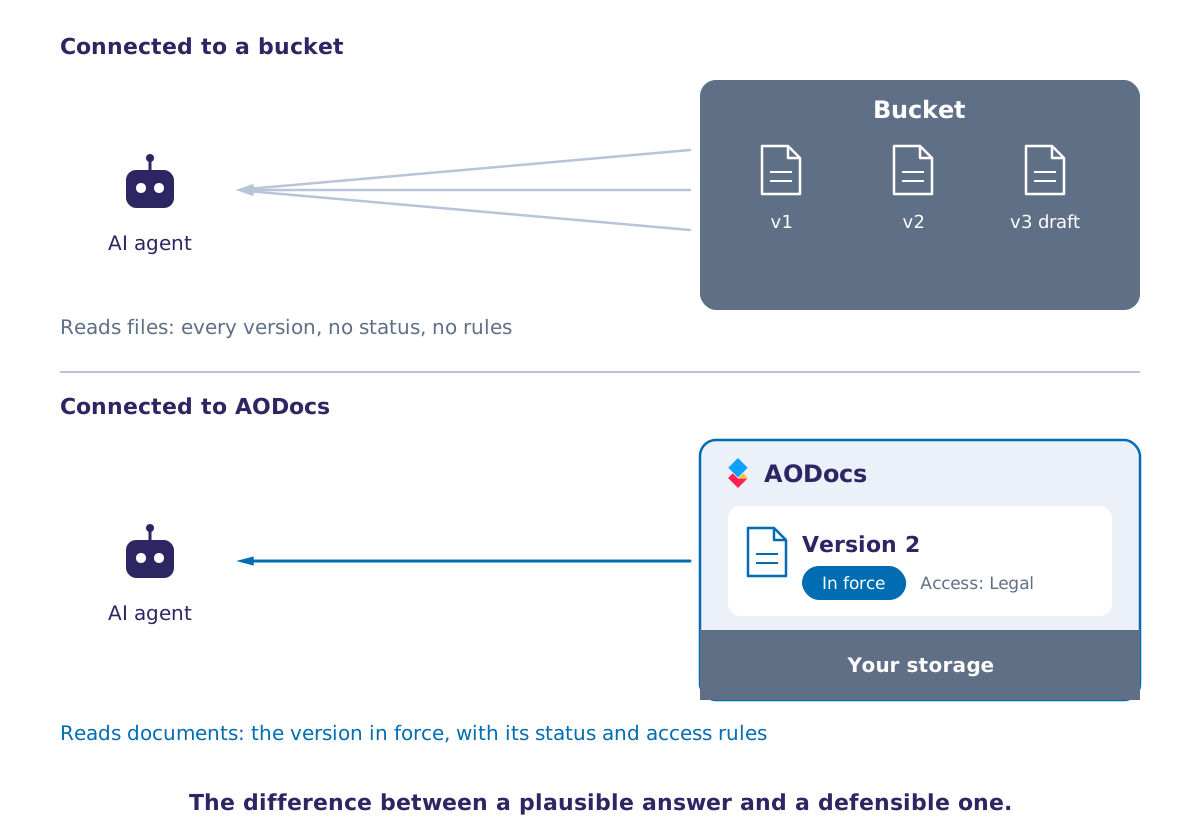
S3 knows which object version was uploaded last. AODocs knows which version is approved: the version in force that people and applications should use, even when a newer draft exists.
The difference matters wherever a wrong version has consequences: using the wrong contract, engineering drawing, quality procedure can cost millions.
And it matters even more when AI agents read your documents. They need the version in force, not the latest upload.
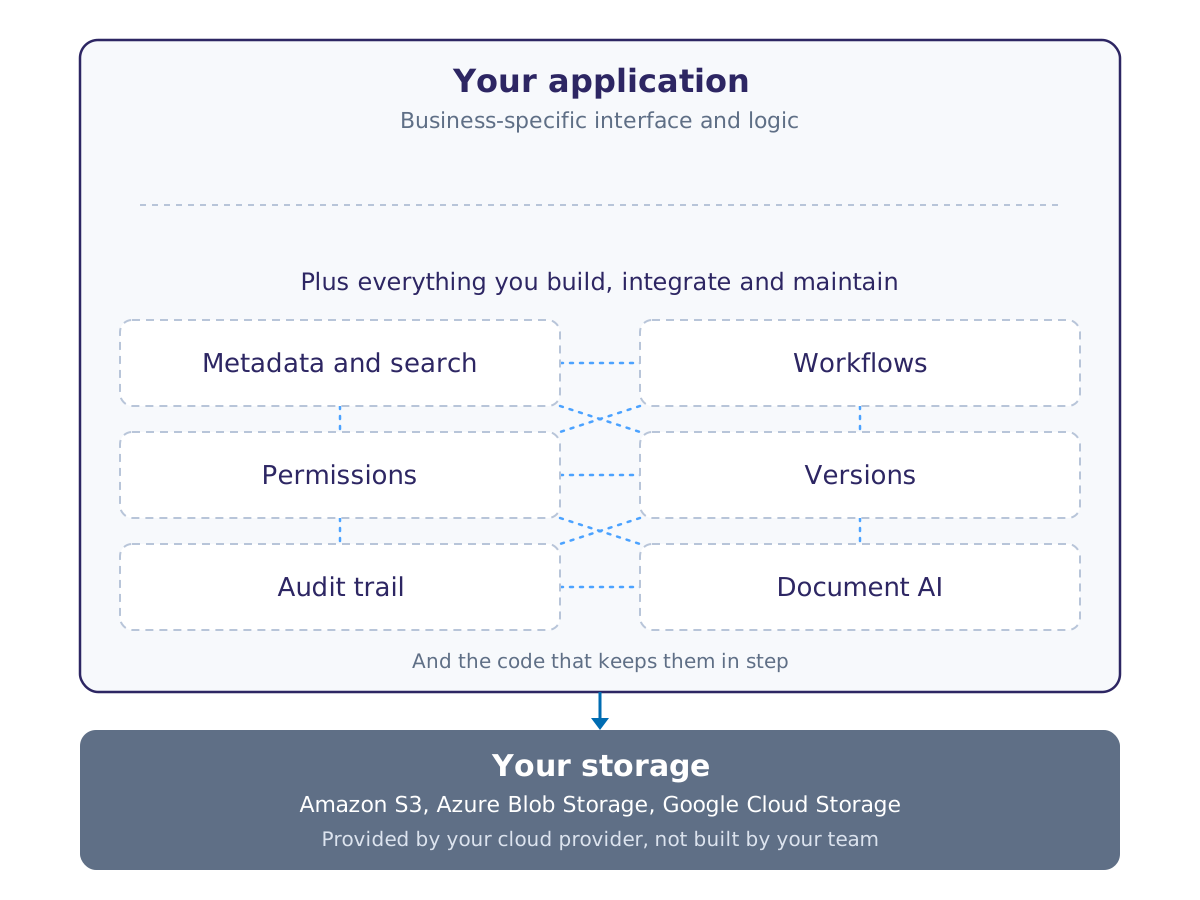
Files sit in a bucket, their metadata in an application database, permissions in IAM, approvals in a workflow service, history in logs. Each piece works. Together, they form a document system nobody designed as one.
And the documents your application creates stay outside the rules the rest of the company applies: retention, permissions, audits, enterprise search, and the sources your AI is allowed to read.
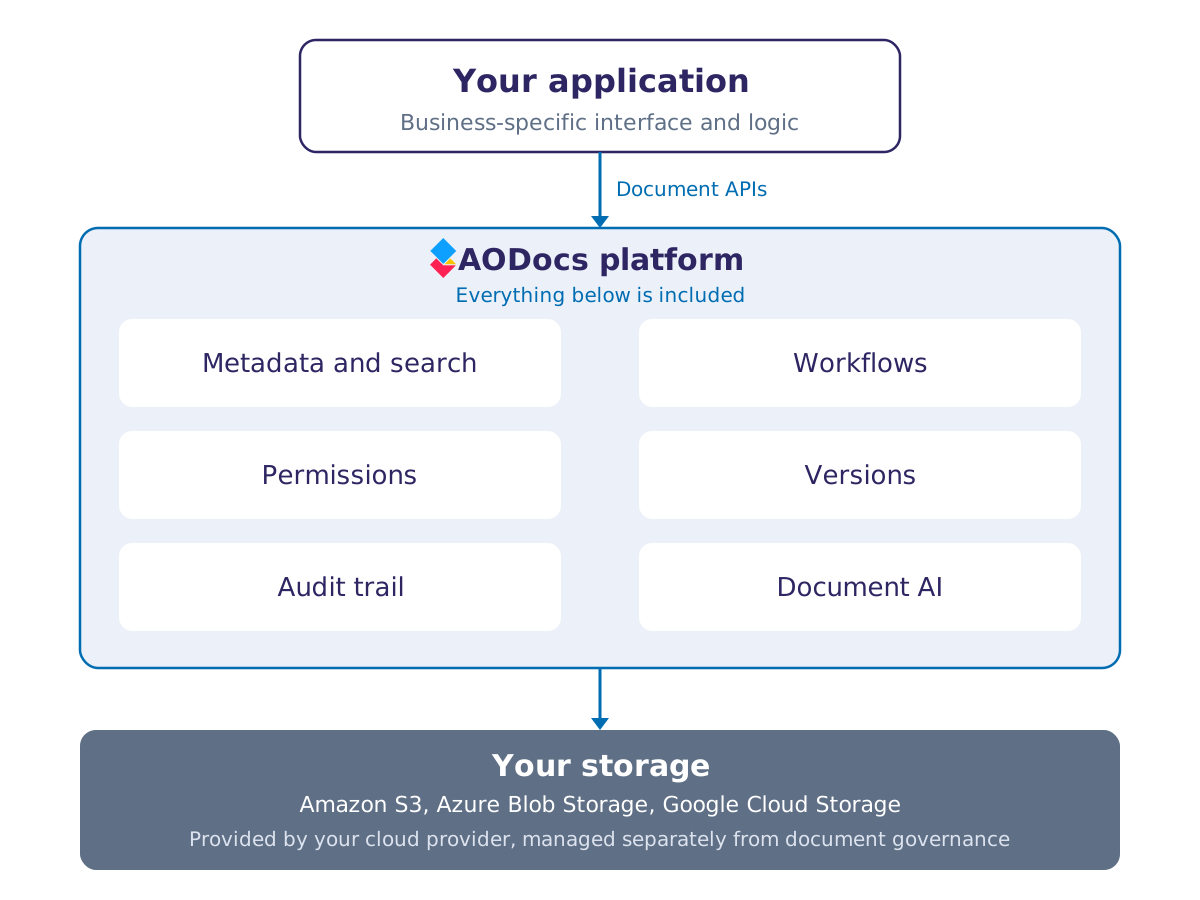
AODocs provides the document layer your application needs, through document-oriented APIs: metadata, versions, statuses, permissions, workflows, audit trail and search. The documents your application creates are governed like the rest of your AODocs content, under the same retention rules, permissions and history.
We decided to build internally, on AWS, the replacement of our legacy document management system. 18 months and 3 million dollars later, we had to give up, the projected maintenance cost were too high.
CIO
of a major Insurance company
18 months - 3 M$
to build a complete document management layer
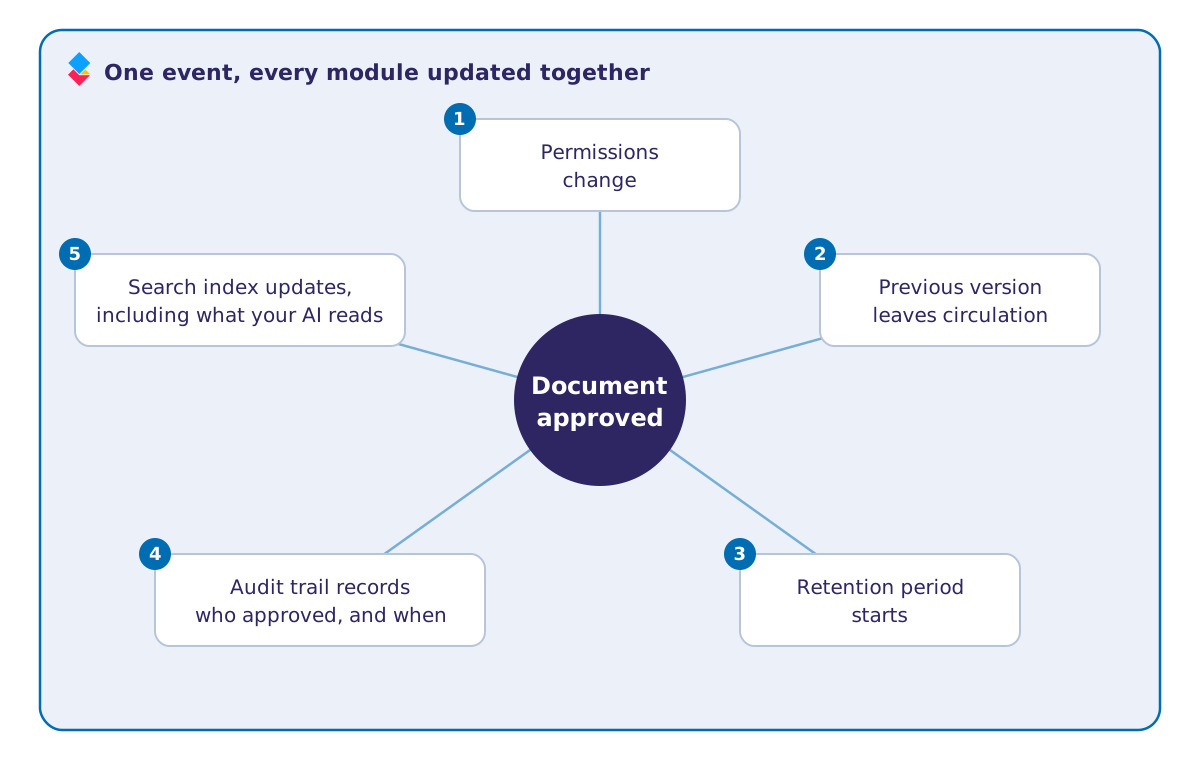
When a document is approved, its permissions change, the previous version leaves circulation, its retention period starts, the audit trail records who approved it and when, and the search index, including what your AI reads, updates. If one step fails halfway, the record can no longer be trusted.
A homegrown system has to get this right in every case, for every document type, at the scale of millions of files, with security that holds when people, rules and storage change. AODocs runs these interactions as one product, tested together and operated at scale.
And shipping the first version is the easy part. Then come years of upgrades, security patches, new regulations and staff turnover, on an internal product nobody outside your company supports.
All the modules your application needs to manipulate documents.
Full-text and metadata search across every document in scope, with results filtered by what each user is entitled to see.
When it matters: when finding a document takes longer than recreating it.
Learn more about Trusted Answers
Folders and sets that carry their own properties, permissions and lifecycle, inherited by everything inside them.
When it matters: when a case, a project or a contract is made of dozens of documents that must behave consistently.
Learn more about Content Assembly
Retention schedules driven by business events and metadata, not by object age, with holds and defensible disposal.
When it matters: when a regulator or a court asks why a document was kept, or why it was not.
Learn more about Retention
Review, approval and assignment paths that fit how decisions are actually made in your organization.
When it matters: when the version in force has to be unambiguous.
Learn more about AI Process Automation
Managed deployment on the storage you choose: Google Drive, Google Cloud Storage, Amazon S3, Azure Blob Storage or SharePoint Embedded, including storage you control.
When it matters: when data residency, sovereignty or an existing cloud commitment decides where your documents must live.
Learn more about Deploy Anywhere
Connectors for Google Workspace, Microsoft 365, SAP and Salesforce, and document-oriented APIs for everything else.
When it matters: when documents must stay in step with the business applications that create and use them.
Learn more about AODocs Integrations
AODocs was built as a platform, not as an application that happens to expose an API. Every capability on this page is reachable programmatically, which gives you three ways to use it.
Use the AODocs interface as it stands, and give your business teams a working document platform on day one.
Or build your own application on top of the AODocs API, and let it handle search, metadata, permissions, retention and audit while your developers build what differentiates your business. The storage stays yours. The platform layer is ours. Your team works on the part that only your team can write.
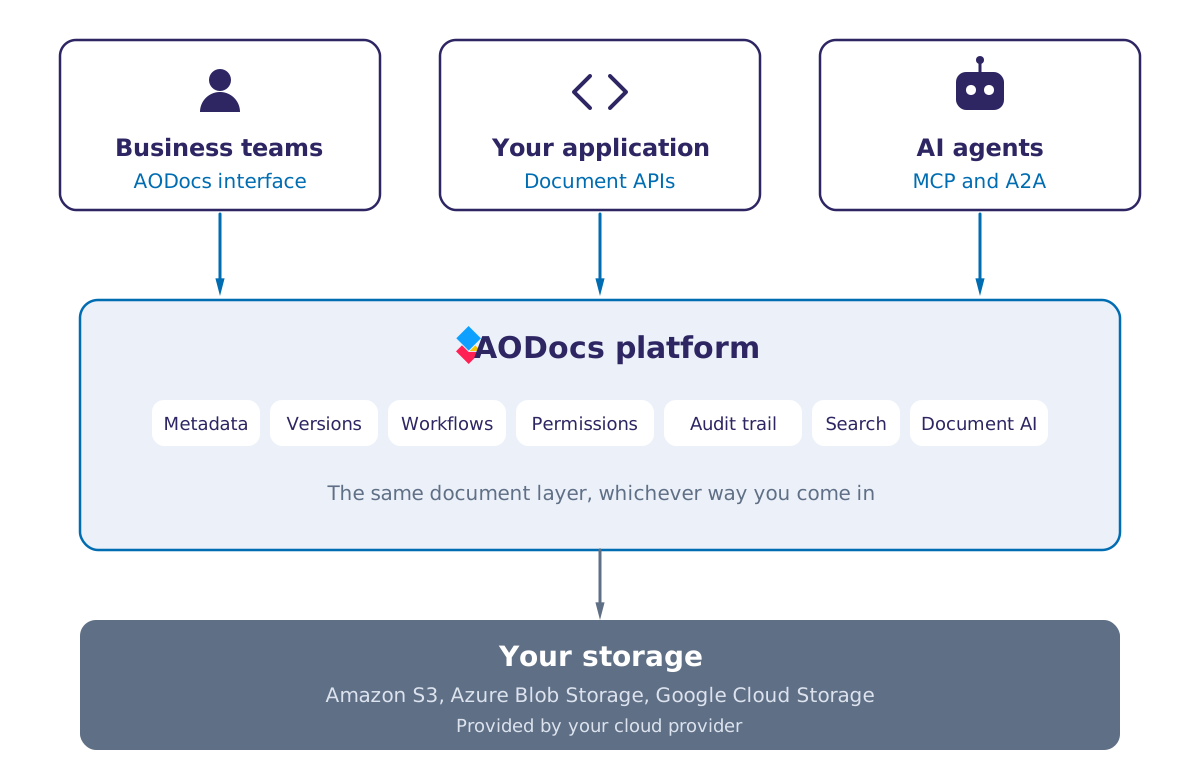
Expose document capabilities to your AI agents through MCP and A2A, so an agent retrieves the version in force rather than whatever it finds, within the permissions of the user it acts for.
An agent connected directly to a bucket reads files. An agent connected to AODocs reads documents, with their status, their metadata and their access rules, which is the difference between a plausible answer and a defensible one.
AODocs governs your documents on the storage you choose. The document layer stays the same, whatever sits underneath.
Your buckets, in your AWS account.
Your containers, in your Azure subscription.
Your buckets, in your Google Cloud project.
Native to Google Workspace.
Inside your Microsoft 365 tenant.
Tell us about your architecture → Contact us
Yes. AODocs does not impose a storage hierarchy. Document sets, properties and permissions live in the platform layer, which means you can reorganize one without touching the other.
No. AODocs reads from and writes to your existing buckets and containers. Your storage architecture, your region and your encryption keys stay as they are.
Object Lock and Azure immutability policies compute retention from the age of the object. AODocs computes it from business events held in metadata, such as the end of a contract or the closure of a case, and applies holds, reviews and defensible disposal on that basis. The two work together: AODocs can drive the native immutability features rather than replace them.
Document and folder operations, metadata read and write, search, permission evaluation, workflow actions and audit queries. The same API serves the AODocs interface, your own applications and MCP-connected agents.
Tell us what your application needs to do with documents, and we will tell you honestly whether you need us.